> For the complete documentation index, see [llms.txt](https://docs.violetlabs.com/llms.txt). Markdown versions of documentation pages are available by appending `.md` to page URLs; this page is available as [Markdown](https://docs.violetlabs.com/apps/i/ion/set-up-webhooks-in-ion.md).
# Set up webhooks in ION
Enable real-time data fetching from ION to Violet
#### Setup webhooks from Violet to ION
1. Create an [ION integration in Violet](/apps/i/ion.md).
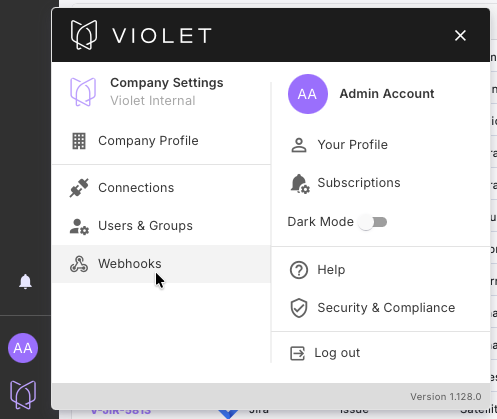
2. Navigate to the **Webhooks** page in Violet:
3. Create a Webhook URL in Violet, selecting the ION integration when prompted to select an integration.
4. Copy and save the Webhook URL generated within Violet - ***THIS WILL ONLY DISPLAY ONCE***.
5. In ION, navigate to the GraphQL query runner in the bottom-left corner of your ION environment:
6. In the ION query runner, run the following code to create a webhook receiver - *replace the* `webhookUri` *with the one generated in Violet as shown in the Input block below*.
```typescript
# Create a receiver
mutation CreateWebhookReceiver($input: CreateWebhookReceiverInput!) {
createWebhookReceiver(input: $input) {
webhookReceiver {
id name description webhookUri sharedSecret contentType expectedResponseCode
active subscriptions { resource action id } headers { key value id }
}
}
}
# Input
{
"input": {
"name": "Violet",
"webhookUri": "Replace this with the url copied from Violet"
}
}
```
6. Copy the Receiver ID of the Webhook receiver created by the above query.
7. In the ION query runner, run the query below to subscribe to all supported resource and action types, replacing the receiverId with the id of the receiver created above. If you want, you can subscribe to only some resource and action types by only running a subset of the queries.
```typescript
mutation {
abomUpdate: createWebhookSubscription(input: { resource: ABOM_INSTALLATIONS, action: UPDATE, receiverId: "2" }) {
webhookSubscription { id _etag }
}
abomCreate: createWebhookSubscription(input: { resource: ABOM_INSTALLATIONS, action: CREATE, receiverId: "2" }) {
webhookSubscription { id _etag }
}
filesUpdate: createWebhookSubscription(input: { resource: FILE_ATTACHMENTS, action: UPDATE, receiverId: "2" }) {
webhookSubscription { id _etag }
}
filesCreate: createWebhookSubscription(input: { resource: FILE_ATTACHMENTS, action: CREATE, receiverId: "2" }) {
webhookSubscription { id _etag }
}
issuesUpdate: createWebhookSubscription(input: { resource: ISSUES, action: UPDATE, receiverId: "2" }) {
webhookSubscription { id _etag }
}
issuesCreate: createWebhookSubscription(input: { resource: ISSUES, action: CREATE, receiverId: "2" }) {
webhookSubscription { id _etag }
}
organizationsUpdate: createWebhookSubscription(input: { resource: ORGANIZATIONS, action: UPDATE, receiverId: "2" }) {
webhookSubscription { id _etag }
}
organizationsCreate: createWebhookSubscription(input: { resource: ORGANIZATIONS, action: CREATE, receiverId: "2" }) {
webhookSubscription { id _etag }
}
partsUpdate: createWebhookSubscription(input: { resource: PARTS, action: UPDATE, receiverId: "2" }) {
webhookSubscription { id _etag }
}
partsCreate: createWebhookSubscription(input: { resource: PARTS, action: CREATE, receiverId: "2" }) {
webhookSubscription { id _etag }
}
planInputsUpdate: createWebhookSubscription(input: { resource: PLAN_INPUTS, action: UPDATE, receiverId: "2" }) {
webhookSubscription { id _etag }
}
planInputsCreate: createWebhookSubscription(input: { resource: PLAN_INPUTS, action: CREATE, receiverId: "2" }) {
webhookSubscription { id _etag }
}
planItemsUpdate: createWebhookSubscription(input: { resource: PLAN_ITEMS, action: UPDATE, receiverId: "2" }) {
webhookSubscription { id _etag }
}
planItemsCreate: createWebhookSubscription(input: { resource: PLAN_ITEMS, action: CREATE, receiverId: "2" }) {
webhookSubscription { id _etag }
}
plansUpdate: createWebhookSubscription(input: { resource: PLANS, action: UPDATE, receiverId: "2" }) {
webhookSubscription { id _etag }
}
plansCreate: createWebhookSubscription(input: { resource: PLANS, action: CREATE, receiverId: "2" }) {
webhookSubscription { id _etag }
}
proceduresUpdate: createWebhookSubscription(input: { resource: PROCEDURES, action: UPDATE, receiverId: "2" }) {
webhookSubscription { id _etag }
}
proceduresCreate: createWebhookSubscription(input: { resource: PROCEDURES, action: CREATE, receiverId: "2" }) {
webhookSubscription { id _etag }
}
purchaseOrderLinesUpdate: createWebhookSubscription(input: { resource: PURCHASE_ORDER_LINES, action: UPDATE, receiverId: "2" }) {
webhookSubscription { id _etag }
}
purchaseOrderLinesCreate: createWebhookSubscription(input: { resource: PURCHASE_ORDER_LINES, action: CREATE, receiverId: "2" }) {
webhookSubscription { id _etag }
}
purchaseOrdersUpdate: createWebhookSubscription(input: { resource: PURCHASE_ORDERS, action: UPDATE, receiverId: "2" }) {
webhookSubscription { id _etag }
}
purchaseOrdersCreate: createWebhookSubscription(input: { resource: PURCHASE_ORDERS, action: CREATE, receiverId: "2" }) {
webhookSubscription { id _etag }
}
receiptsUpdate: createWebhookSubscription(input: { resource: RECEIPTS, action: UPDATE, receiverId: "2" }) {
webhookSubscription { id _etag }
}
receiptsCreate: createWebhookSubscription(input: { resource: RECEIPTS, action: CREATE, receiverId: "2" }) {
webhookSubscription { id _etag }
}
receiptItemsUpdate: createWebhookSubscription(input: { resource: RECEIPT_ITEMS, action: UPDATE, receiverId: "2" }) {
webhookSubscription { id _etag }
}
receiptItemsCreate: createWebhookSubscription(input: { resource: RECEIPT_ITEMS, action: CREATE, receiverId: "2" }) {
webhookSubscription { id _etag }
}
runsUpdate: createWebhookSubscription(input: { resource: RUNS, action: UPDATE, receiverId: "2" }) {
webhookSubscription { id _etag }
}
runsCreate: createWebhookSubscription(input: { resource: RUNS, action: CREATE, receiverId: "2" }) {
webhookSubscription { id _etag }
}
runStepsUpdate: createWebhookSubscription(input: { resource: RUN_STEPS, action: UPDATE, receiverId: "2" }) {
webhookSubscription { id _etag }
}
runStepsCreate: createWebhookSubscription(input: { resource: RUN_STEPS, action: CREATE, receiverId: "2" }) {
webhookSubscription { id _etag }
}
stepUpdate: createWebhookSubscription(input: { resource: STEPS, action: UPDATE, receiverId: "2" }) {
webhookSubscription { id _etag }
}
stepCreate: createWebhookSubscription(input: { resource: STEPS, action: CREATE, receiverId: "2" }) {
webhookSubscription { id _etag }
}
suppliersUpdate: createWebhookSubscription(input: { resource: SUPPLIERS, action: UPDATE, receiverId: "2" }) {
webhookSubscription { id _etag }
}
suppliersCreate: createWebhookSubscription(input: { resource: SUPPLIERS, action: CREATE, receiverId: "2" }) {
webhookSubscription { id _etag }
}
}
```
8. Now, any changes and creations on the resources you’ve subscribed to will come into Violet proactively.
#### Known Limitations
1. Webhook events are not trigged when new `Purchase Order Lines` are created
2. Webhook events are not triggered in a way that Violet currently supports when property values transition from `empty` to `populated`. These properties will update correctly in Violet on the next scheduled fetch.
3. Certain properties, especially those linked to another ION object (for example, the shipping address on an ION `Order`, which references an ION `location` object) arrive in an unsupported format within the Webhook. In these cases, the object will update correctly in Violet on the next scheduled fetch.
4. For newly created objects in ION, some fields may not be fully populated in Violet until the next fetch.
---
# Agent Instructions
This documentation is published with GitBook. GitBook is the documentation platform designed so that both humans and AI agents can read, navigate, and reason over technical content effectively. Learn more at gitbook.com.
## Querying This Documentation
If you need additional information that is not directly available in this page, you can query the documentation by asking a question.
Perform an HTTP GET request on the following URL with the `ask` and `goal` query parameters:
```
GET https://docs.violetlabs.com/apps/i/ion/set-up-webhooks-in-ion.md?ask=&goal=
```
`ask` is the immediate question: it should be specific, self-contained, and written in natural language.
`goal` is what the user is ultimately trying to achieve, the reason they need the answer. Sharing it helps GitBook give you a better, more relevant answer. A goal is most helpful when it describes the outcome the user wants rather than restating the question. For example, with `ask=how do I create an API token`, a goal like `automate deployments from our CI pipeline` lets GitBook tailor the answer to that use case.
The response will contain a direct answer to the question and relevant excerpts and sources from the documentation.
Use this mechanism when the answer is not explicitly present in the current page, you need clarification or additional context, or you want to retrieve related documentation sections.