 Boltline and create an integration
First, set up and configure your Boltline integration, following the instructions [here](/apps/b/boltline.md). \
\
Ensure that you are fetching the data types that you wish to sync. For the Onshape to Boltline sync, you must choose **Parts**.
{% endstep %}
{% step %}
### Connect
Boltline and create an integration
First, set up and configure your Boltline integration, following the instructions [here](/apps/b/boltline.md). \
\
Ensure that you are fetching the data types that you wish to sync. For the Onshape to Boltline sync, you must choose **Parts**.
{% endstep %}
{% step %}
### Connect  Onshape
Next, connect Onshape or Onshape Gov, following the instructions [here](/apps/o/onshape.md).
{% endstep %}
{% step %}
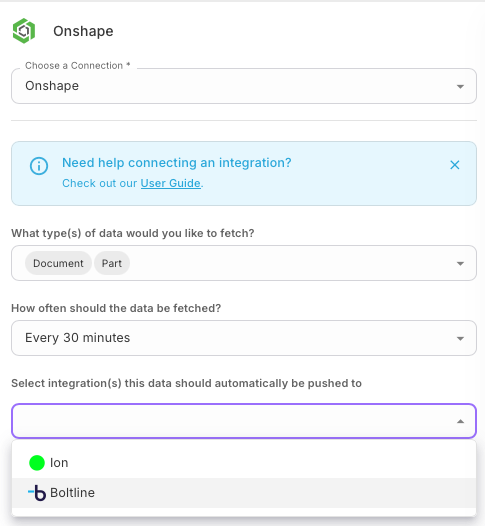
### Configure Onshape integration and Boltline sync
Once you are connected to Onshape, configure your integration:
* Select the types of data you want to fetch. Ensure that you are fetching the data types that you wish to push (for the Onshape to Boltline sync, you must choose Parts).
* Choose the folders you wish to fetch parts from
* Specify how often data should be fetched
Last, configure your Boltline sync:
* Choose the Boltline integration that you wish to sync to
Onshape
Next, connect Onshape or Onshape Gov, following the instructions [here](/apps/o/onshape.md).
{% endstep %}
{% step %}
### Configure Onshape integration and Boltline sync
Once you are connected to Onshape, configure your integration:
* Select the types of data you want to fetch. Ensure that you are fetching the data types that you wish to push (for the Onshape to Boltline sync, you must choose Parts).
* Choose the folders you wish to fetch parts from
* Specify how often data should be fetched
Last, configure your Boltline sync:
* Choose the Boltline integration that you wish to sync to
Violet Labs is a proud member of the Onshape Partner Program.
Looking for Onshape integration functionality you don't see listed here? Reach out to us at hello@violetlabs.com.
--- # Agent Instructions This documentation is published with GitBook. GitBook is the documentation platform designed so that both humans and AI agents can read, navigate, and reason over technical content effectively. Learn more at gitbook.com. ## Querying This Documentation If you need additional information that is not directly available in this page, you can query the documentation by asking a question. Perform an HTTP GET request on the following URL with the `ask` and `goal` query parameters: ``` GET https://docs.violetlabs.com/features/workflows/data-sync-workflows/example-syncs/onshape-to-boltline.md?ask=