> For the complete documentation index, see [llms.txt](https://docs.violetlabs.com/llms.txt). Markdown versions of documentation pages are available by appending `.md` to page URLs; this page is available as [Markdown](https://docs.violetlabs.com/features/workflows/data-sync-workflows/approve-and-monitor-syncs.md).
# Approve and monitor syncs
## **Pending changes**
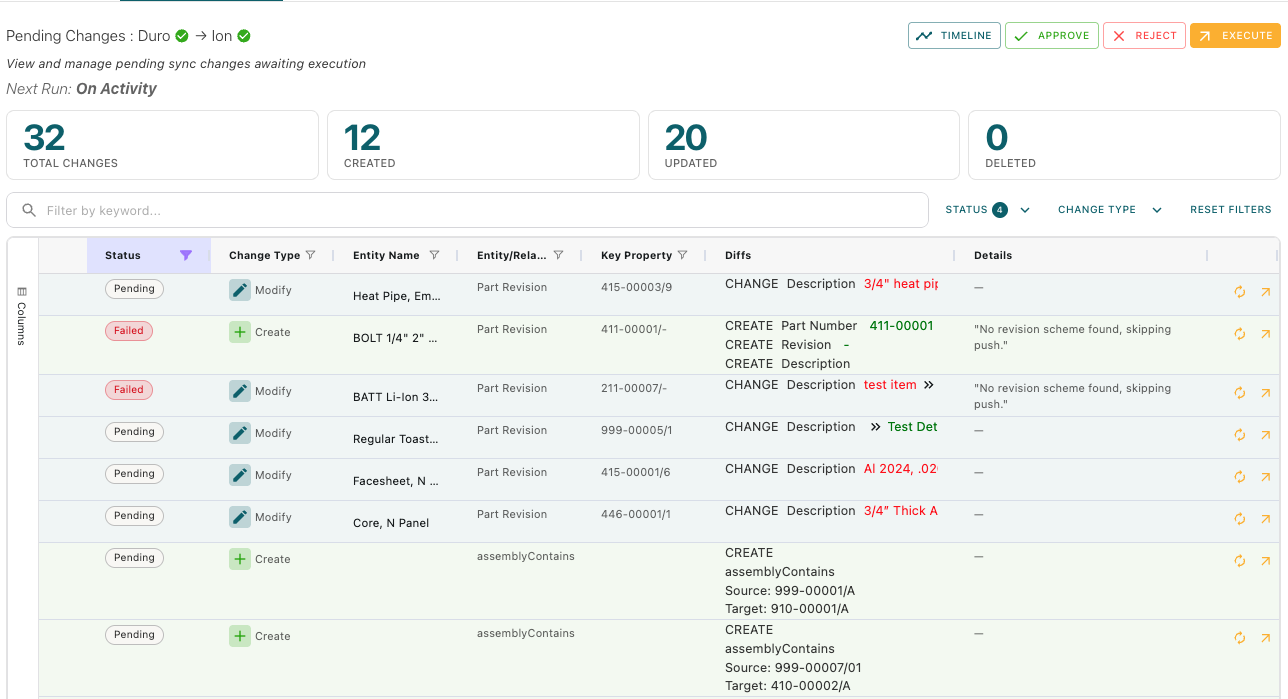
If you choose to execute your sync workflow on a *schedule* or on *approval*, Violet won't apply changes directly — it will generate **Pending Changes** for you to review first.
* After a workflow run, open the **Pending Changes** tab to see what will be created, updated, or deleted
* Each batch shows a breakdown by change type before anything is applied to the target system
* Once a sync batch is executed (following your approval or per the established schedule), it moves to **Sync History** with a full record of what succeeded, failed, or was skipped.
Entity-by-entity sync change data is visible as Pending Changes before a sync has been executed, or in the Sync History after a sync has occurred. You can use the keyword search bar above the table, or filter/order the columns in the table by clicking on the column header to find specific entries that you want to verify or investigate.
Clicking any row in the table will show you the details of which properties have been updated, and list all the properties that have remained unchanged.
### Approving an individual change
If you want to approve one line item in the pending change batch, click the small arrow in the right-most column.
## Sync history
Sync History is organized by *Batches*. In each Sync Batch you will see all of the sync changes and their status.
For any entity syncs that **Failed** or were **Skipped**, the details will explain the reason for the failure or why that entity was skipped. Failures sometimes occur due to missing permissions or data completeness problems, which can typically be fixed by the user.
Skipped syncs are common - if an entity did not sync because of your workflow filtering configuration, or none of the properties that you mapped between your source and target have changed, it will have a status of "Skipped"
## Sync Validation
After a sync is executed, Violet performs a validation process to compare what we intended to do against what was actually implemented in the target system. The following validation values may be returned:
* Failed — Violet compared values and they don’t match (drift), or delete validation failed (e.g. item should be deleted but isn’t).
* Passed — Comparison ran and everything matched.
* Superseded — A newer sync change for the same target replaced this one; validation on the old row was intentionally skipped.
* Pending — Validation hasn’t run yet (often waiting for the target integration to fetch fresh data).
* Inconclusive — Something prevented Violet from completing the validation.
Note: a sync change can show Success for execution and Inconclusive for validation.
---
# Agent Instructions
This documentation is published with GitBook. GitBook is the documentation platform designed so that both humans and AI agents can read, navigate, and reason over technical content effectively. Learn more at gitbook.com.
## Querying This Documentation
If you need additional information that is not directly available in this page, you can query the documentation by asking a question.
Perform an HTTP GET request on the following URL with the `ask` and `goal` query parameters:
```
GET https://docs.violetlabs.com/features/workflows/data-sync-workflows/approve-and-monitor-syncs.md?ask=&goal=
```
`ask` is the immediate question: it should be specific, self-contained, and written in natural language.
`goal` is what the user is ultimately trying to achieve, the reason they need the answer. Sharing it helps GitBook give you a better, more relevant answer. A goal is most helpful when it describes the outcome the user wants rather than restating the question. For example, with `ask=how do I create an API token`, a goal like `automate deployments from our CI pipeline` lets GitBook tailor the answer to that use case.
The response will contain a direct answer to the question and relevant excerpts and sources from the documentation.
Use this mechanism when the answer is not explicitly present in the current page, you need clarification or additional context, or you want to retrieve related documentation sections.