> For the complete documentation index, see [llms.txt](https://docs.violetlabs.com/llms.txt). Markdown versions of documentation pages are available by appending `.md` to page URLs; this page is available as [Markdown](https://docs.violetlabs.com/features/requirements/best-practices.md).
# Best practices
### Organizing your Requirements
There are a variety of methods to organizing your Violet requirements; choose the option that aligns best to your current approaches. Keep in mind:
* Child requirements are created via hierarchical nesting in Violet
* You can associate multiple systems with a single requirement (a requirement might be about the solar array, involving both electrical and mechanical subsystems)
* There are two tabular views of requirements you can easily toggle between - one organized by requirement hierarchy and the other organized by assigned system (see [Structure](/features/requirements/structure.md)). Use [Graph or Document views](/features/requirements/views.md) to inspect requirements, as well.
#### (Recommended) Use Requirements as Requirements
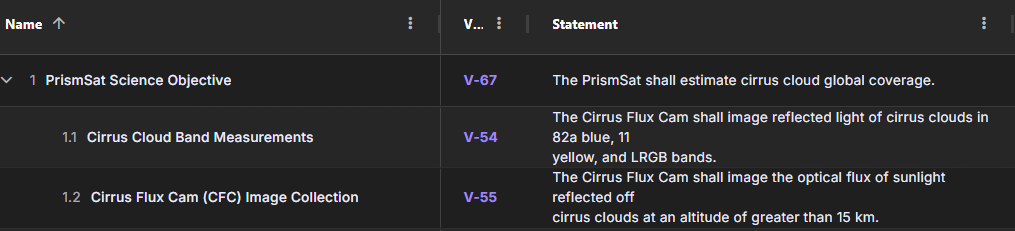
In this approach, requirements are decomposed directly into their children at the next level. The top-level of requirements is the top-level specification(s).
Benefits of this strategy include:
* Clear parent/child relationships
* Every element in every view is a requirement; no extraneous information
Drawbacks of this strategy include:
* Traditional “specification tree” view isn’t readily discernible (workaround: use the “system” view to group the requirements table by associated system, approximating a spec tree)
* Reduced opportunity to provide supporting information that might relate to multiple requirements (Workaround: custom attributes can enable requirement-specific info)
#### Use Requirements Objects as Specifications and Headings
In this approach, requirement objects act as requirements (shall statements needing verification), specifications (a collection of requirements on a similar subject), section headings (smaller groups of requirements), and descriptive text.
Benefits of this strategy include:
* Resembles a more traditional, document-based requirements view
* Provides a means to add additional context to requirements, such as introductions
Drawbacks of this strategy include:
* Challenging to readily distinguish requirements that must be verified from supporting or organizing information (which are also requirements objects)
* Extra elements in some tabular views
#### Group Requirements within Folders
This organization option utilizes a folder for each specification (set or collection of requirements for a given part of the system, ICD, test specs, relevant company standards, etc.).
Add a folder description to clarify the scope of content in that folder or add introductory text. Nest folders to group and order requirements into a helpful outline; you can reorder the outline with the “Enable Organize” button.
Benefits of this strategy include:
* Resembles a more traditional, document-based outline view
* Easily distinguishes requirements that must be verified from supporting or organizing information
Drawbacks of this strategy include:
* Loss of parent-child decomposition (higher-level requirements in a separate folder from lower-level (derived) requirements in another folder aren’t linked with a parent/child relationship, because parent/child is expressed by nesting in Violet)
* Extra elements (folders) visible in some tabular and graphical views
### Other Recommendations
Consider using [Parameters](/features/parameters.md) to store facts and context about the mission, system or design that aren’t necessarily requirements that must be verified. These parameters can be linked to [Scripts](/features/scripts.md) and analyses that reference that fact as an input variable.
---
# Agent Instructions
This documentation is published with GitBook. GitBook is the documentation platform designed so that both humans and AI agents can read, navigate, and reason over technical content effectively. Learn more at gitbook.com.
## Querying This Documentation
If you need additional information that is not directly available in this page, you can query the documentation by asking a question.
Perform an HTTP GET request on the following URL with the `ask` and `goal` query parameters:
```
GET https://docs.violetlabs.com/features/requirements/best-practices.md?ask=&goal=
```
`ask` is the immediate question: it should be specific, self-contained, and written in natural language.
`goal` is what the user is ultimately trying to achieve, the reason they need the answer. Sharing it helps GitBook give you a better, more relevant answer. A goal is most helpful when it describes the outcome the user wants rather than restating the question. For example, with `ask=how do I create an API token`, a goal like `automate deployments from our CI pipeline` lets GitBook tailor the answer to that use case.
The response will contain a direct answer to the question and relevant excerpts and sources from the documentation.
Use this mechanism when the answer is not explicitly present in the current page, you need clarification or additional context, or you want to retrieve related documentation sections.