> For the complete documentation index, see [llms.txt](https://docs.violetlabs.com/llms.txt). Markdown versions of documentation pages are available by appending `.md` to page URLs; this page is available as [Markdown](https://docs.violetlabs.com/features/programs/shared-programs.md).
# Shared programs
**Shared programs** allow you to control how much requirement information is visible to partners or customers (typically added to your instance as [Guest Users](/resources/administrative/invite-your-team.md#guest-users)), enabling seamless collaboration without revealing "work in progress" or internal data. You can limit both the requirements that are visible as well as their attributes. Requirements are only modifiable in the source program; If you want to copy requirements for subsequent modification or reuse, see [Cloning Programs](/features/programs.md#clone-programs-for-requirements-reuse)..
Shared programs can aid in the following example scenarios:
1. You want your customer to see how you've decomposed their specification to the next level, but you don't want them to see lower-level, internal design requirements.
2. You want to share key requirement attributes with customers while hiding other attributes from view.
### Creating a shared program
#### Initiate and configure the shared program
You must be a Program Manager and/or Additional Author of a program to create a new shared program.
1. Navigate to your originating program and click Edit
2. In the "Sharing" panel, click "+ Shared Program"
1\.
```
```
3. Enter a name for the new Shared Program and indicate whether the Shared Program permits access to external users
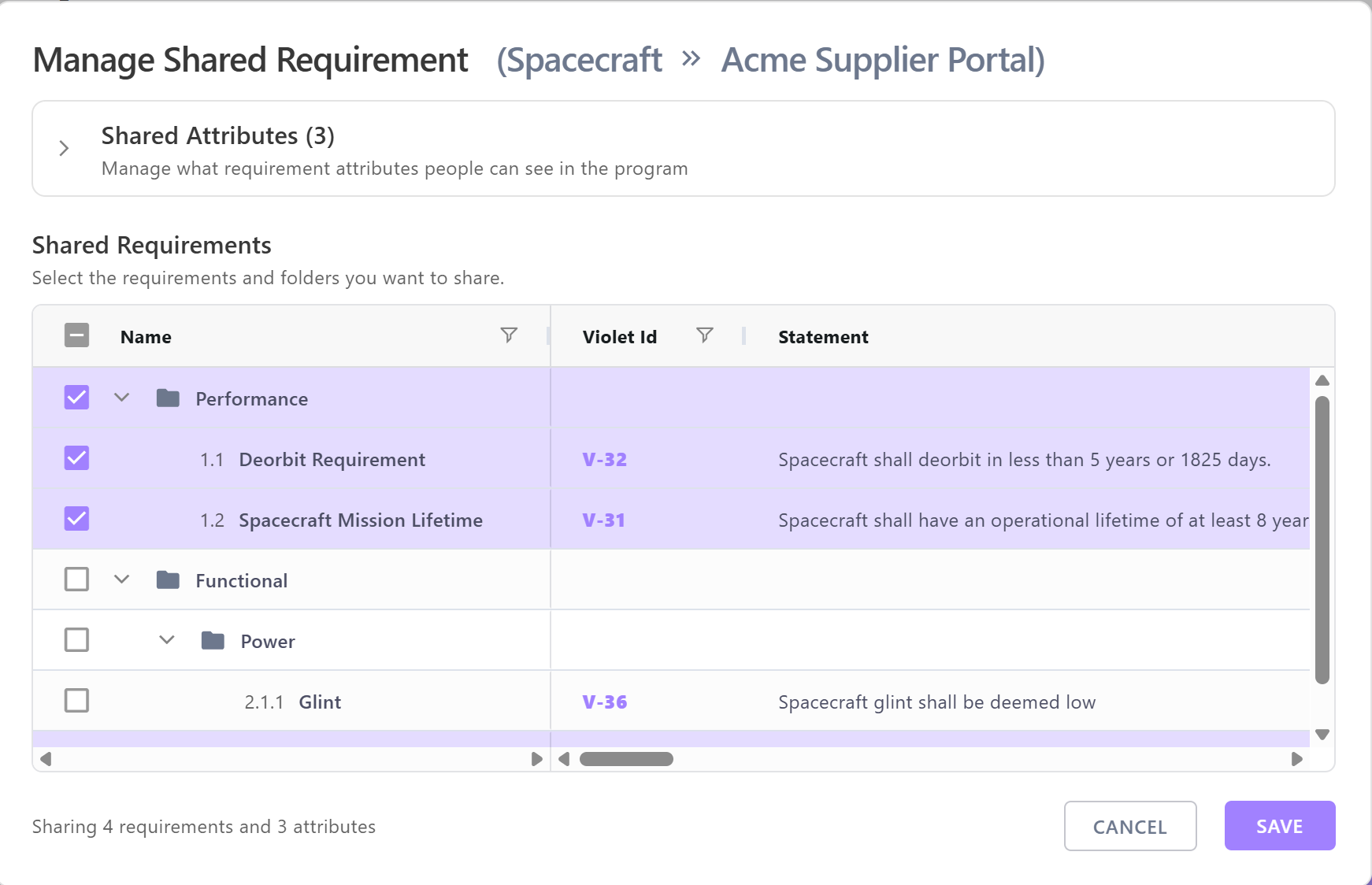
4. In the "Manage Shared Requirement" window:
1. Select which requirement attributes you want to share (all attributes are hidden by default)
2. Select which individual requirements you want to share (all requirements are hidden by default). Note: Sharing a lower-level child requirement will share it's parent(s) up the tree to provide context to reviewers.
5. Click Save
Existing users with permissions to the originating program will inherit access to shared programs by default (but you can remove them from the shared program as appropriate).
#### Add users
To permit your customers or partners access to the shared data, you must add them as users to the Shared Program. (If you haven't already [invited them to Violet](/resources/administrative/invite-your-team.md), do that first)
1. Select the Shared Program from the Programs list (or from within the originating program) to open the View Program side panel and click Edit
2. Add your new users to the shared program (typically, as Team Members).
3. Click Save
Users are not synchronized between originating and shared programs: for example, if you add or remove an additional author from the originating program, you must also remove them from the shared program if you no longer want them to have access.
### Collaborating in a shared program
* Changes made to the originating program are automatically visible in the shared program.
* Users cannot view requirement version history in a Shared Program. Members of shared programs only see the latest version.
* Requirement hierarchy numbering is not visible in a shared program in order to avoid revealing skipped requirements.
* Comments made in a shared program are only visible in the shared program.
* Peer reviews can be created for shared programs; comments made in peer reviews will only be visible in the peer review.
---
# Agent Instructions
This documentation is published with GitBook. GitBook is the documentation platform designed so that both humans and AI agents can read, navigate, and reason over technical content effectively. Learn more at gitbook.com.
## Querying This Documentation
If you need additional information that is not directly available in this page, you can query the documentation by asking a question.
Perform an HTTP GET request on the following URL with the `ask` and `goal` query parameters:
```
GET https://docs.violetlabs.com/features/programs/shared-programs.md?ask=&goal=
```
`ask` is the immediate question: it should be specific, self-contained, and written in natural language.
`goal` is what the user is ultimately trying to achieve, the reason they need the answer. Sharing it helps GitBook give you a better, more relevant answer. A goal is most helpful when it describes the outcome the user wants rather than restating the question. For example, with `ask=how do I create an API token`, a goal like `automate deployments from our CI pipeline` lets GitBook tailor the answer to that use case.
The response will contain a direct answer to the question and relevant excerpts and sources from the documentation.
Use this mechanism when the answer is not explicitly present in the current page, you need clarification or additional context, or you want to retrieve related documentation sections.